PhotoParents

Editing in Lightroom

AKA : how to bring your photos to life

“You don't take a photograph. You make it" - Ansel Adams

Editing is an essential skill for anyone with even just a passing interest in photography.

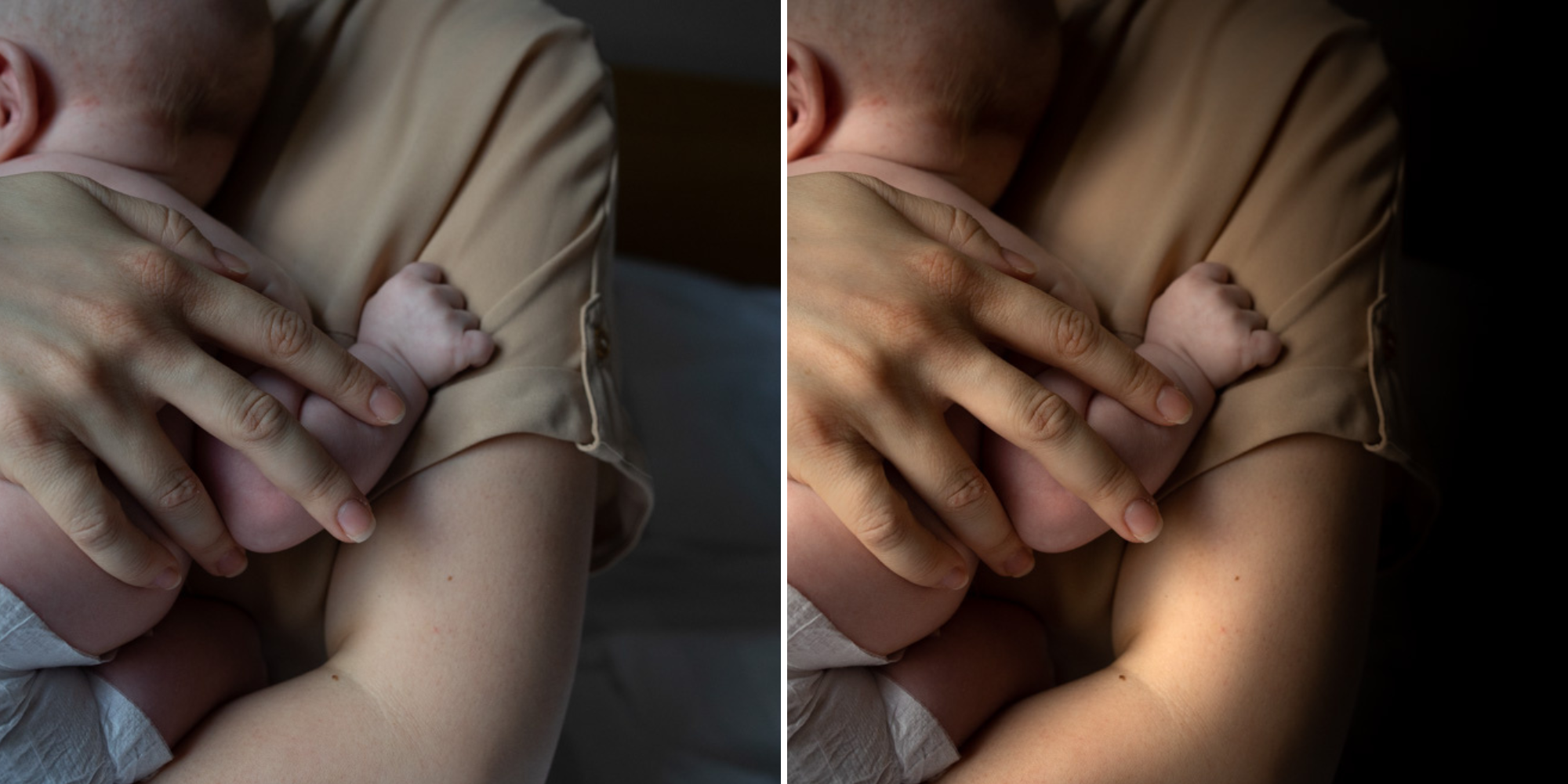
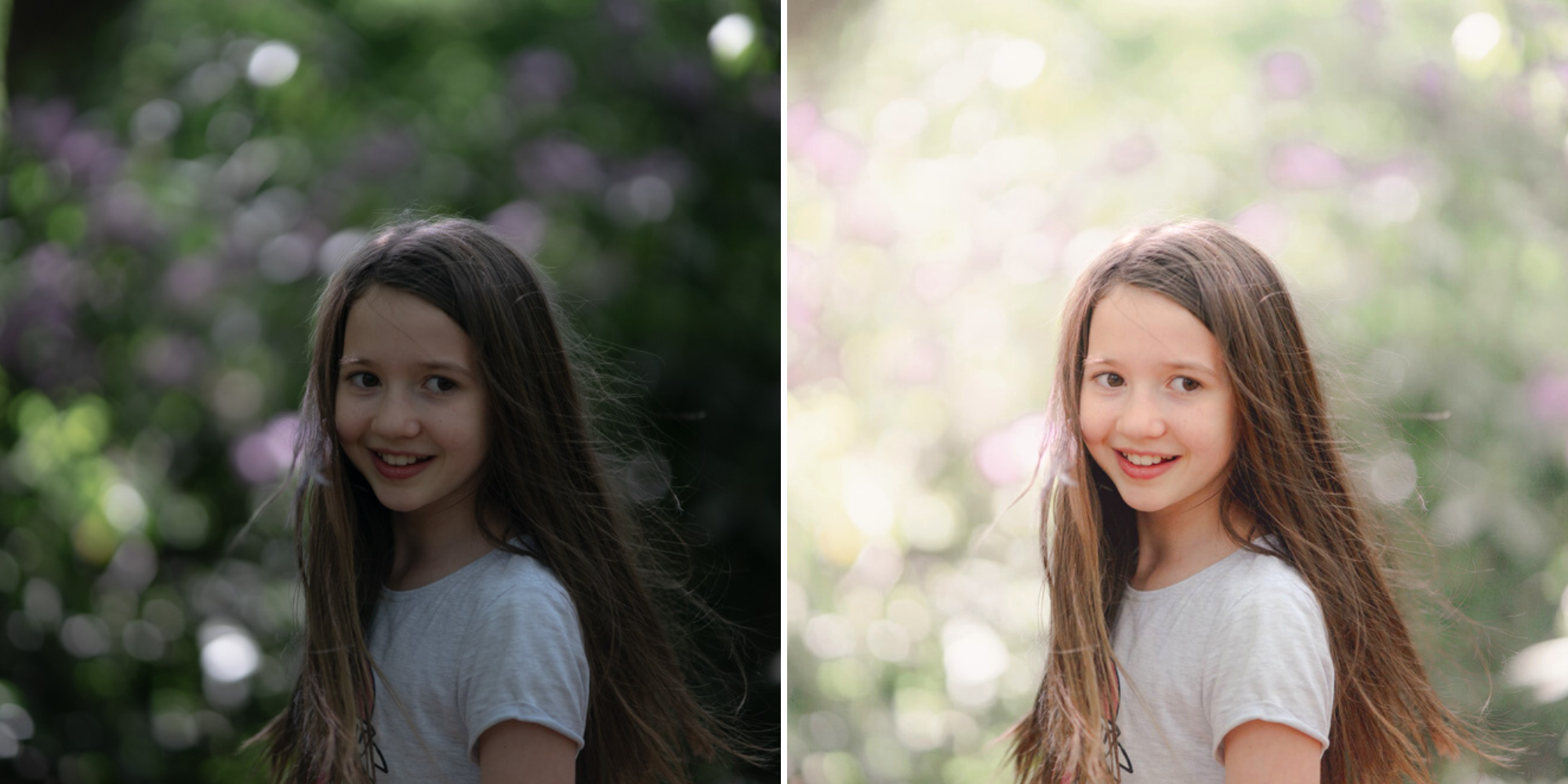
Much as we try, we can't always get everything right in camera and editing tools help us bring our vision to life, help correct problems and allow our images to look beautifully polished.

KEY COURSE INFO:
  • Course type: self-paced or instructor-led
  • Course duration: 4 weeks + prep module
  • Skill Level: no previous editing or photography experience required
  • Software required: you need Lightroom or Lightroom classic installed on your phone / tablet or computer
what you learn:

Good and purposeful editing goes way beyond just slapping on a preset or a filter - in our course we teach you all about the tools - not just what all of them do but how, and we teach you how to know what to use and when to achieve certain effects. 

  • You will learn the process of editing - from learning to see what the image actually needs to aactually knowing when to stop and how to prevent your images from looking over-edited
  • You will learn Lightroom inside and out - and learn what your tools are actually designed to do and how to use them - but also why you'd use some over others
  • You will learn how to create different outcomes - from light and airy to dark and moody edits and learn to add light, polish and tone to your photos 

  • KEY COURSE SKILLS 
    •  editing to correct common photo problems
    •  creating good editing workflow 
    • using powerful precision tools
    • editing to achieve beautiful skin tones
    • using light and colour creatively
    • editing to bring out a mood of a feel

    This is the course for you if :

    • Love taking photos but want them to look more polished  - with colours that pop and light that's perfectly balanced
    • You want to be able to fix common issues such as under- or overexposure, white balance or colour casts so that you never need to bin an image just because it wasn't right straight out of camera
    • You want to get more creative with light and colour to make the images look just like the moment felt. Bring on the moody edits or sun soaked edits or light kissed skin tones or creative black and white conversions
    • You want to confidently use the editing techniques so you can bring your vision to life every time, without guesswork
    • You want to be able to prepare your images for print so that your walls can beam with pride at the beauty that you captured


    HERE IS WHAT YOU WILL LEARN in this course : 

    Our Photo Editing in Lightroom course guides you through the photo editing process in Adobe Lightroom from start to finish – from setting it up correctly, organising your collections and creating a workflow that works for you, through learning the capabilities of all the editing tools - such as adjusting exposure, colours, light or sharpening the images; all the way to printing and creating  photo books.

    We’ll show you how to create specific artistic effects ( high impact Black and white, vintage, light and airy, dark and moody etc ), and how to fix common photography problems ( grainy images, underexposed images, wrong colours etc). At the end of the course you will be able to confidently manage your photo collection with Lightroom, achieve desired artistic effects and make your photos truly stand out.

    • Getting around in Lightroom and Lightroom Classic - with confidence and full knowledge on what you can expect from its tools
    • Correcting common problems - whether your photo started too dark or too bright, your child's face was in a shade, the white balance and colours were off, the grain was heavy, the light looked dull - you can fix it all within a couple of clicks in Lightroom
    • Using Lightroom's super powerful intelligent masking tools to quickly and efficiently edit specific parts of your image - from brightening up the eyes to rescuing overblown skies
    • Enhancing and adding beautiful light - light makes images stand out, but it can be hard capturing the atmosphere it creates in camera at times. Lightroom is where you can bring light to life and make your images feel how what you saw in real life
    • Knowing how to shoot in camera so you can get the most in editing -  photographers will often purposefully under or overexpose images in camera so that they have more chance of balancing the image just they way they want in Lightroom.
    • Learning how to play with your images - using colour, tone, sharpness, masking and more - editing can be as creative as capturing photos! 

    Absolutely, without a doubt book Editing. I was very unsure at first. My interest in photography is to capture those memories so it felt like it was 'cheating' to edit. I can honestly say it's like magic.To finish off the pictures you love and just give you complete control over the exposure, colours to make them perfect, to rescue the disasters etc. I learnt so much in those few weeks and it made the biggest difference to my photos. 

    Kerry White

    Photography for Parents Fundamentals

    Next course starts on 19 June 2023

    Ready to start clicking? There are two 2 ways to learn with us:
    OPTION 1: Fully immersed : 
    Where you get all the materials, all the personal support, all the bonuses. It's THE best way to learn and get the most of our course if you ask us! 

    OPTION 2: Light touch

    All the core learning materials and bonus materials but excluding the interactive elements such as our live class, personal feedback on your images  - perfect for the more independent students  

            recommended

    Fully immersed

    All the learning resources, all the community, all the support, all the personal help. Virtually failproof
    • 5 core course modules 
    • Bonus Idea Bank module
    • PDF course workbook
    • Pocket reference guide 
    • Support group 
    • Weekly online live class
    • Personal Feedback on your images
    • Access to Photography For Parents Alumni community

    SPRING SALE 

    Ends Monday

    15th May

    £259/£159

    Self-paced

    Core learning resources and follow on access to  Photography for Parents community 
    • 5 core course modules 
    • Bonus Idea Bank module
    • PDF course workbook
    • Pocket reference guide 
    • Access to Photography For Parents Alumni community
    • Support group 
    • Weekly online live class
    • Personal Feedback on your images

    £129

    PhotoParents Editing in Lightroom

    Photoparents Editing in Lightroom course is available as part of the Photoparents Membership - along with access to the full course library, weekly assignments, Camera Clubs, and a community of 200+ parent photographers at a similar stage to you.

    Monthly and annual membership options: 

    £

    32

    MONTHLY MEMBERSHIP

    Rolling membership, cancel anytime

    • Access to Editing in Lightroom and 12 other courses
    • Self-paced and instructor led classes
    • Photoparents Camera Club Membership with weekly and monthly tutorials, interest clubs, community hub, downloadable PDF materials and more

    £

    269

    ANNUAL MEMBERSHIP

    30% off compared to monthly membership

    • Access to Editing in Lightroom and 12 other courses
    • Self paced and instructor led classes
    • Photoparents Camera Club Membership with weekly and monthly tutorials, interest clubs, community hub, downloadable PDF materials and more

    PLUS - exclusive for annual members only:

    • Two 30 min 1-1 mentoring sessions with Ania to help you progress fast

    All the learning resources, all the community, all the support, all the personal help. Virtually failproof

    Frequently asked questions

    What pre-existing editing knowledge do I need to start the course?

    You don't need any specific knowledge of editing, even if you've never edited any image in your life - we take you through the process step by step, from set up to more complex edits so you gradually build on the new knowledge.

    What do I need for the course?

    You need Lightroom or Lightroom Classic installed on your computer, tablet or phone. They are available on a subscription basis from Adobe at the cost of approx £9 pm but you can usually get it cheaper through amazon in sales periods

    Do you provide the editing software?

    No, you will need to purchase the software yourself. Lightroom is available on subscription from Adobe at a cost of approximately £9p/m, but it can often be purchased at a lower price through amazon or groupon

    Do I need a computer? Or can I edit on my phone or tablet?

    Lightroom can be used on both stationary desktops, laptops and tablets and the editing tools are pretty much the same across all these devices ( bar a couple of minor exceptions). 

    Are there specific tech requirements for my computer?

    Yes. Your device needs to be reasonably fast to make the most of the tools available within Lightroom. Adobe provides minimum and recommended specification for your device and the most up to date recommendations can be seen here: https://helpx.adobe.com/uk/lightroom-cc/system-requirements.html 

    I don't have lightroom, but have another editing software - will this course work for me?

    Although we teach a solid editing workflow and process and the types of tools you will see across different editing software packages are often similar, this course specifically focuses on how to edit using Adobe Lightroom so I wouldn't recommend signing up if you work on a different kind of software as you simply won't get the full benefit of it.

    Can I buy the course without becoming a member?

    No. The course is a part of our membership offerring - we can support you best in that way, ensure you have all necessary resources available to you and that you can connect with a likeminded peer group - all the things we KNOW to greatly increase your chances of actually completing the course, rather than just downloading and forgetting about it. But the membership doesn't tie you down - you can cancel anytime, even after 1 month if tthat's what you want. 

    How do I choose between self-paced and instructor-led course

    You will have access to the self-paced version of the course immediately after you join as a member and log into our learning space. Beyond that, all our courses get regularily scheduled Live, instructor led runs. You can will be able to see available live run courses schedule for the upcoming months from your membership area but if you've only just missed out on a scheduled course or need help before the next one is run, we can help too - just get in touch. 

    What other courses will I have access to?

    We currently have 13 courses in our range (with more on the way) and the cover a really wide range of core and additional photography skills: 

    • Core Photography skills : Clickstarter ( free), Photoparents Fundamentals and Photoparents Advanced
    • Creative photography : Natural Light Photography, Flash Photography, Let's Play (creative photography techniques), Black and white Photography
    • Editing skills : Photo editing skills, Essential and Creative Photoshop
    • Photography FOR kids: Mini clickers - Photography course
    • Wait, there's more! - Video skills for Parents, Smartphone photography, Action Cam Photography ( part1), 

    Beyond the straight up courses, you will also have access to our brilliant Camera club - with weekly tutorials and assignments, topical clubs, downloadable, printable materials and more! 

    Can I cancel the membership at any time or am I tied in for a period of time?

    Cancel anytime directly from your own member's account. No fuss, no explaining your reasons. To be clear, we hope you won't want to cancel but if you do - it's easy. You just need to cancel before your next billing period and it'll be all done. 

    Should I learn Lightroom or Photoshop? What's the difference?

    Both Lightroom and Photoshop are editing tools that can transform your images, but whether you need one or the other will very much depend on how you edit.


    Lightroom is designed for the photographer who wants to be able to manage and enhance your image with light, exposure, colour etc and the results can be transformative, while keeping the images mostly true to their originals.


    Photoshop is designed to allow you to add or remove elements from your images, perform powerful transformations and give you full control over changing colours etc.


    Both are fantastic tools and both can be really useful for a photographe, but Photoshop's learning curve is much steeper than lightroom, so if you're making your first steps in editing, I'd recommend starting from Lightroom. Once you've mastered that, check out our Photoshop courses! 

    Ready to start getting the absolute best out of your images?

    Got more questions? Just drop me a line - I read and respond to all emails personally


    Name*
    Email*
    Message
    0 of 350